
One prompt, six boxes, 25/25: building an OTP screen in 30 minutes
by James Ngandu dev.to
4 min read
The challenge was simple to state and hard to finish: build an OTP verification screen with one AI prompt, in 30 minutes, and let a CI pipeline and an AI grader decide how good it is. This was hakkahakka26 at droidcon Kenya 2026. The room had 20 teams, a 30-minute clock, and one prompt per team. Teams picked a mobile stack, copied a template, committed the prompt they used as PROMPT.md, added a s…
Topics AI in Flutter apps
More like this
 Video 5 min
Client side functions for Flutter GenUI
by Flutter
Intro to GenUI Codelab → https://g.dev/ai/genui-codelab Commis Demo Source Code (flutter/demos repo) → https://g.dev/ai/git-flutter-demos genui package on pub.dev → https://g.dev/ai/packages-genui Sto...
Watch on YouTube- Article 1 min read
CI Performance Gates for Flutter Physical AI Companion Apps
by vmodal_ai
CI Performance Gates for Flutter Physical AI Companion Apps Performance regressions can arrive through unrelated changes: a new chart, extra JSON parsing, larger images, or more frequent state emissio...
Read on dev.to 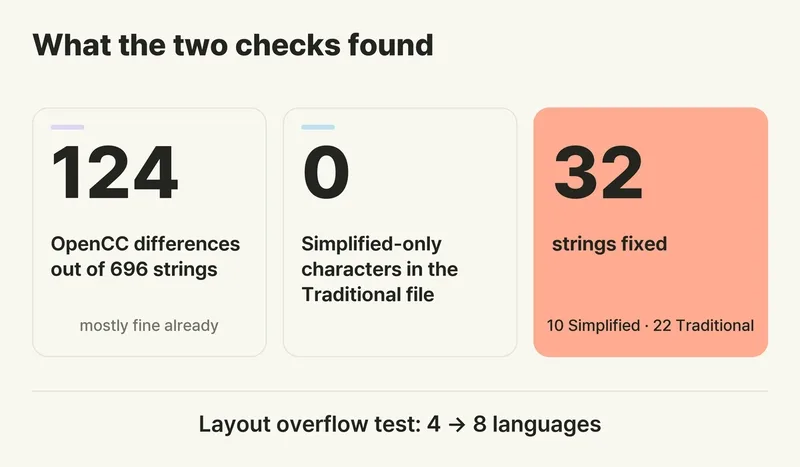 Article 3 min read
A native speaker left one comment. I fixed 32 Chinese strings I can't read.
by BT_Sun
I'm a solo developer from South Korea. I started coding about seven months ago. I can read English, but writing sentences is still difficult without a translator. I can't read Chinese at all. My app,...
Read on dev.to- Article 4 min read
My API Key Is Visible in the Code — How to Fix It
by Israr Kundi
My API key is visible in the code — and if that is what you found, anyone with a copy of your app can see it too. Rotate that key first, then move it off the client, because deleting it from the code...
Read on dev.to


