Flutter Responsive Design Split-Screen: Mobile, Desktop, Web - Section 1 of 5
by Marco Napoli youtube.com
7 min 1.4k views
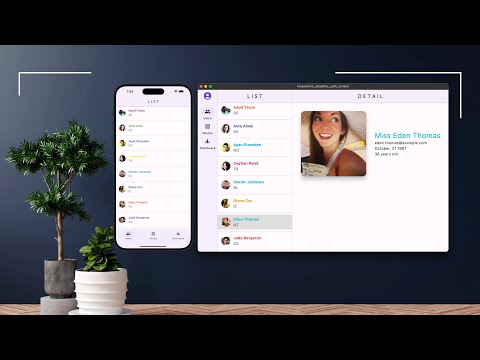
Flutter Split-Screen List and Detail Responsive Design for Phone, Tablet, Desktop, iOS, Android, macOS, Windows, Web What are our objectives? In this course, you'll use Flutter/Dart to develop a responsive app supporting a Split-Screen List/Detail layout from a single code base supporting multi-platform Phone, Tablet, Desktop, and Web. For instance, you'll create the Split-Screen List/Detail on the same screen depending on device, and navigation from List to Detail page on phones. Next, the Desktop and Web requires to handle both Mobile, Desktop, and Web responsive layout when user changes the size of the app’s screen. Guess what? No third-party plugins or packages needed. You’ll start by analyzing the app’s common features, reusable logic, and widgets. You’ll implement Dark and Light Mode, global State Management, and Responsive Layout Builder widget. The Phone app navigates from the List page to the Details page. For the Tablet, Desktop, and Web app, you’ll create a Split-Screen layout showing the List and Detail pages on the same screen. • Build beautifully designed multi-platform application using Flutter and Dart • Learn UI/UX techniques to wow the user’s experience and keep the company’s branding consistent between platforms • Use the latest cross-platform Flutter framework and Dart language to create pixel perfect UI designs and adaptivity • Create reusable widgets • Use Layout Builder to create a responsive layout for mobile and web • Separate concerns between UI, state, and business logic • Learn how to use State Management without using third party libraries • Learn how to create reactive screens to refresh content • Custom navigation between platforms • Create beautiful navigation transitions combining Hero and Navigation transition Why Flutter? Flutter transforms the development process. Build, test, and deploy beautiful mobile, web, desktop, and embedded experiences from a single codebase. Flutter is an open source framework by Google for building beautiful, natively compiled, multi-platform applications from a single codebase. Fast Flutter code compiles to ARM or Intel machine code as well as JavaScript, for fast performance on any device. Productive Build and iterate quickly with Hot Reload. Update code and see changes almost instantly, without losing state.\ Flexible Control every pixel to create customized, adaptive designs that look and feel great on any screen. Multi-Platform Reach users on every screen Deploy to multiple devices from a single codebase: mobile, web, desktop, and embedded devices. Stable & Reliable Trusted by many Flutter is supported and used by Google, trusted by well-known brands around the world, and maintained by a community of global developers. What you’ll learn • Split-Screen Responsive Design • Navigation for List and Detail on different pages • Split-Screen List and Detail pages on the same screen • Portrait and Landscape modes • Phones, Tablets, Desktops, and the Web • Layouts according to available device size • Switch from mobile detail page to Split-Screen layout while resizing • Dark and Light mode • Reusable logic and widgets • Nested Navigation • App-wide state management Are there any course requirements or prerequisites? • Basic Flutter and Dart knowledge Who this course is for: • Easily create Mobile, Tablet, Desktop, and Web Responsive Split-Screen Design in Flutter • Beginner and experienced developers You can find course resources like project's source code, helper code files, slides at: https://github.com/JediPixels/course_split_screen_responsive https://JediPixels.dev
Made by
 Marco Napoli
@marconapoli 🇺🇸 United States
Marco Napoli
@marconapoli 🇺🇸 United States
Available for hire
Marco Napoli is the CEO of Pixolini an experienced mobile, web and desktop app developer. He has a proven record in developing visually elegant and simple-to-us...
View Marco on Flutter ProTopics State management Navigation and routing Performance
Apps by Marco Napoli


Fatima Prayers
The Five Fatima Prayers


Conyers - Our Loving Mother
On November 30, 1987, while Nancy was in silent prayer of the heart in her home, the Crucifix was illuminated in a bright whiter than white light. The image of the corpus was engulfed in light and became lifelike.


Nine Choirs of Angels
The Nine Choirs of Angels, are hierarchical orders or choirs of angels in heaven. These choirs are grouped into three spheres, each consisting of three choirs, based on their proximity to God and their assigned duties.
- Featured


TimeStamp Private Journal
Capture life’s moments with TimeStamp! Cherish connections by tracking everyone who shared your special times. Download now and make your memories unforgettable!
More like this
- Article 7 min read
Importance of Flutter State Management
by Eng Mouaz M AlShahmeh , on Flutter ProEng Mouaz M AlShahmeh @mouaz_m_shahmeh 🇸🇾 SyriaAvailable for hire
Software Engineer & Developer, Tadawl real-estate Flutter App General Director Developer, TQDR Pay system Funder.
View Eng on Flutter ProWhat is Flutter State Management?
Read on medium.com  Video 1 min
The best state management in Flutter is revealed
 by
shivam srivastava
, on Flutter Pro
shivam srivastava
@theshivamlko 🇮🇳 India
by
shivam srivastava
, on Flutter Pro
shivam srivastava
@theshivamlko 🇮🇳 India
Mobile Solution Architect, Experience in Android, Flutter, Dart Web, GoLang, Founder of Navoki.com, Udacity Android Nanodegree, Entrepreneur, Instructor Featur...
View shivam on Flutter ProRevealed Best State Management package in #flutterdev for #beginners Pick any package, u want to use * Practice on multiple apps * Learn maintaining state across app * Later u can switch to other pack...
Watch on YouTube Video 9 min
Flutter State Management Made easy- Everything you need to Know about Flutter State Management.
 by
Radhika Goswami
, on Flutter Pro
Radhika Goswami
@radhikagoswami 🇮🇳 India
by
Radhika Goswami
, on Flutter Pro
Radhika Goswami
@radhikagoswami 🇮🇳 India
Available for hire
I am a 16-year girl who always gets amazed by seeing APPs but I always heard that Java is kinda hard to learn, it's not for me but then I suddenly came across t...
View Radhika on Flutter ProI have created this video with the intention to explain state management in an easy way, and I have explained what is State, the Difference between ephemeral state and app state, and what is state man...
Watch on YouTube Article 20 min read
scoped_model vs BloC_pattern vs states_rebuilder
by MELLATI Meftah
In Flutter, state management techniques differ in: How, Where and when to call setState. This article answers these How-Where-When…
Read on medium.com